Add Order History Table and Total Purchased to ‘My Account’ in WooCommerce
[May 2024]
A Tutorial with Full Code
-
Skip Steps and Jump to Functions.php Code for Total Sales for Customer
-
Skip Steps and Jump to Code for Complete Order Table in WooCommerce.
-
I need Manual Payments and to Show Remaining Amount Due
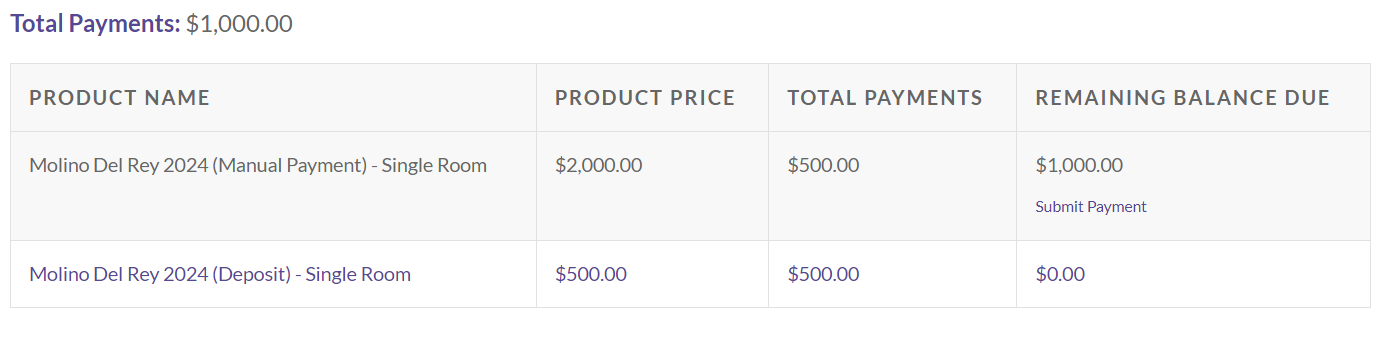
We had a very specific use-case for a client who ran retreats. This client needed their customers to be able to make manual payments towards the retreat. The client also wanted to make sure a customer knew what they had paid thus far and their balance due. As a quick solution, we built a Gravity From that we added to the My Account page, which allowed customers to view their orders and manually calculate their balance. After seeing the confusion it caused, we jumped into showing customers their orders by product (an order could include payments towards multiple retreats) and the difference between the set retreat cost, manual payments, and the deposit to reserve a spot.
In this example, I go through the steps to add the code to your WordPress functions.php and provide ways to adjust the code to progressively add more information.
Step 1:
The first step and use case is to display the Total Purchase Amount a customer has made on your website. There are a lot of different reasons why you may want to show the total spend on a customer account in WooCommerce. This is incorporated slightly differently in the Steps lower in this tutorial, but the code below can be added to functions.php and embedded on a page with the short code [user_total_spent]
add_shortcode('user_total_spent', 'get_user_total_spent');

function get_user_total_spent( $atts ) {
    extract( shortcode_atts( array(
        'user_id' => get_current_user_id(),
    ), $atts, 'user_total_spent' ) );

    if( $user_id > 0 ) {
        $customer = new WC_Customer( $user_id ); // Get WC_Customer Object

        $total_spent = $customer->get_total_spent(); // Get total spent amount

        return wc_price( $total_spent ); // return formatted total spent amount
    }
}

// USAGE: [user_total_spent] or [user_total_spent user_id="118"]
Step 2:
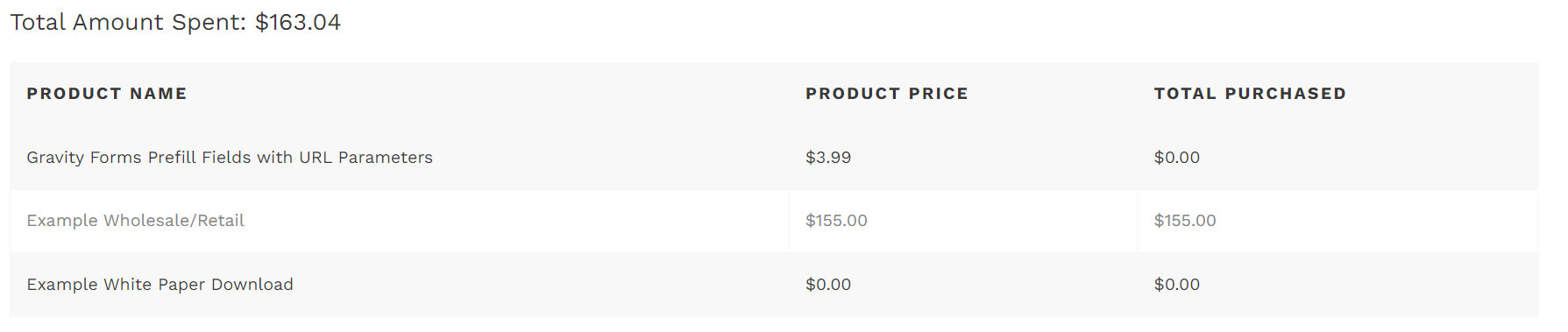
The second step is adding a table of the products ordered and the total spend per product.
// Usage [total_amount_spent]
// Add total amount spent for a customer to My Account page
add_shortcode('total_amount_spent', 'total_amount_spent_shortcode');
function total_amount_spent_shortcode() {
    if (is_user_logged_in()) {
        $customer_id = get_current_user_id();
        $total_spent = wc_get_customer_total_spent($customer_id);

        // Output total amount spent
        $output = '<p>Total Amount Spent: ' . wc_price($total_spent) . '</p>';

        // Output table of total amount spent per product
        $output .= '<table>';
        $output .= '<thead><tr><th>Product Name</th><th>Total Cost</th></tr></thead>';
        $output .= '<tbody>';

        // Get total amount spent per product
        $orders = wc_get_orders(array(
            'customer' => $customer_id,
            'status' => array('completed')
        ));

        $product_totals = array();
        foreach ($orders as $order) {
            foreach ($order->get_items() as $item_id => $item) {
                $product_id = $item->get_product_id();
                $product_name = $item->get_name();
                $product_total = $item->get_total();

                if (!isset($product_totals[$product_id])) {
                    $product_totals[$product_id] = array(
                        'name' => $product_name,
                        'total' => 0
                    );
                }

                $product_totals[$product_id]['total'] += $product_total;
            }
        }

        // Output product totals
        foreach ($product_totals as $product_id => $product_data) {
            $product = wc_get_product($product_id);
            if ($product) {
                $output .= '<tr>';
                $output .= '<td>' . $product_data['name'] . '</td>';
                $output .= '<td>' . wc_price($product_data['total']) . '</td>';
                $output .= '</tr>';
            }
        }

        $output .= '</tbody>';
        $output .= '</table>';

        return $output;
    }
}
// USAGE: [total_amount_spent]
Step 3:
From here we wanted to also show the product price in addition to the amount spent per product.
With simple products, the product price is retrieved using the get_price() method, which returns the base price of the product variation. This means that it does not account for any variations in price due to specific variations selected by the customer.
If you need to display the price of the specific variation that was purchased, you’ll need to adjust the code to retrieve the variation price instead of the base product price. WooCommerce provides methods to retrieve variation data. You can use the get_variation_price() method to get the price of a specific variation.
In this code we also include Processing Orders in addition to Completed Orders.
// Usage [total_amount_spent]
// Add total amount spent for a customer to My Account page
add_shortcode('total_amount_spent', 'total_amount_spent_shortcode');
function total_amount_spent_shortcode() {
    if (is_user_logged_in()) {
        $customer_id = get_current_user_id();
        $total_spent = wc_get_customer_total_spent($customer_id);

        // Output total amount spent
        $output = '<p>Total Amount Spent: ' . wc_price($total_spent) . '</p>';

        // Output table of total amount spent per product
        $output .= '<table>';
        $output .= '<thead><tr><th>Product Name</th><th>Product Price</th><th>Total Cost</th></tr></thead>';
        $output .= '<tbody>';

        // Get total amount spent per product
        $statuses = array('completed', 'processing'); // Include processing orders
        $orders = wc_get_orders(array(
            'customer' => $customer_id,
            'status' => $statuses
        ));

        $product_totals = array();
        foreach ($orders as $order) {
            foreach ($order->get_items() as $item_id => $item) {
                $product_id = $item->get_product_id();
                $product_name = $item->get_name();
                $product_price = $item->get_subtotal(); // Get the product price
                $product_total = $item->get_total();

                if (!isset($product_totals[$product_id])) {
                    $product_totals[$product_id] = array(
                        'name' => $product_name,
                        'price' => $product_price, // Store the product price
                        'total' => 0
                    );
                }

                $product_totals[$product_id]['total'] += $product_total;
            }
        }

        // Output product totals
        foreach ($product_totals as $product_id => $product_data) {
            $product = wc_get_product($product_id);
            if ($product) {
                $output .= '<tr>';
                $output .= '<td>' . $product_data['name'] . '</td>';
                $output .= '<td>' . wc_price($product_data['price']) . '</td>'; // Display product price
                $output .= '<td>' . wc_price($product_data['total']) . '</td>';
                $output .= '</tr>';
            }
        }

        $output .= '</tbody>';
        $output .= '</table>';

        return $output;
    }
}
// USAGE: [total_amount_spent]
Access the Final Version Used of this Code
The final version of this code made sure to pull in the variable product’s price as well as show the Remainder Due for a product where manual payments are allowed.
This final version of the code is available for purchase. Please see below!